> ## Documentation Index
> Fetch the complete documentation index at: https://api.fanvue.com/docs/llms.txt
> Use this file to discover all available pages before exploring further.
# Webhooks Overview
> Receive real-time Fanvue events via webhooks: setup, payloads, and delivery.
Webhooks are a way for your app to receive live notifications of activity on your user's accounts.
The flat platform events listed below are **deprecated** in favour of the
[`creator.*` events](/docs/creator/overview), which use one consistent
[Standard-Webhooks envelope](/docs/creator/overview#event-envelope) and carry
richer payloads. The legacy events continue to fire during the migration
window, so existing integrations keep working — but new integrations should
use `creator.*`. See [Migrating from the legacy
events](/docs/creator/overview#migrating-from-the-legacy-events).
The legacy event types (deprecated):
* Message Received → [`creator.message.received`](/docs/creator/messages)
* Message Sent → [`creator.message.sent`](/docs/creator/messages)
* Message Read → [`creator.message.read`](/docs/creator/messages)
* New Follower → [`creator.follow.created`](/docs/creator/engagement)
* New Subscriber → [`creator.subscription.activated`](/docs/creator/subscriptions)
* Subscription Cancelled → [`creator.subscription.cancel_at_period_end_changed`](/docs/creator/subscriptions)
* Subscription Expired → [`creator.subscription.deactivated`](/docs/creator/subscriptions)
* Purchase Received → [`creator.payment.succeeded`](/docs/creator/payments)
* Tip Received → [`creator.payment.succeeded`](/docs/creator/payments)
If the creator has Fanvue Checkout enabled, your app can subscribe to the
[checkout webhooks](/docs/checkout/overview) (`checkout_link.*`, `payout.paid`)
from the **same Events tab** described below. They require the `read:creator`
scope and are delivered with a [Standard-Webhooks
envelope](/docs/checkout/overview#event-envelope) (branch on `data.object`). Your
app's own sales (purchases, subscriptions, refunds, disputes) are covered by
the [App Webhooks](/docs/app-store/webhooks) (`app.*`), configured from the same
Events tab and gated on the `read:self` scope.
**Bundled vs separate subscription and payment.** The legacy
`subscription.new` event bundles the subscription detail and the payment
(`price`, `transactionOrderId`, `transactionOrderStatus`) into one payload. On
the newer envelope (`creator.*`) and checkout events, the subscription and the
payment arrive as **separate** events that you correlate yourself; checkout
links them via the subscription uuid.
## Setting up a webhook
1. Set up an endpoint on your backend to receive webhooks. It should accept POST requests from our API and return a 2xx response.
2. Navigate to the Fanvue Developer Area, select your app and open the **Events** tab.
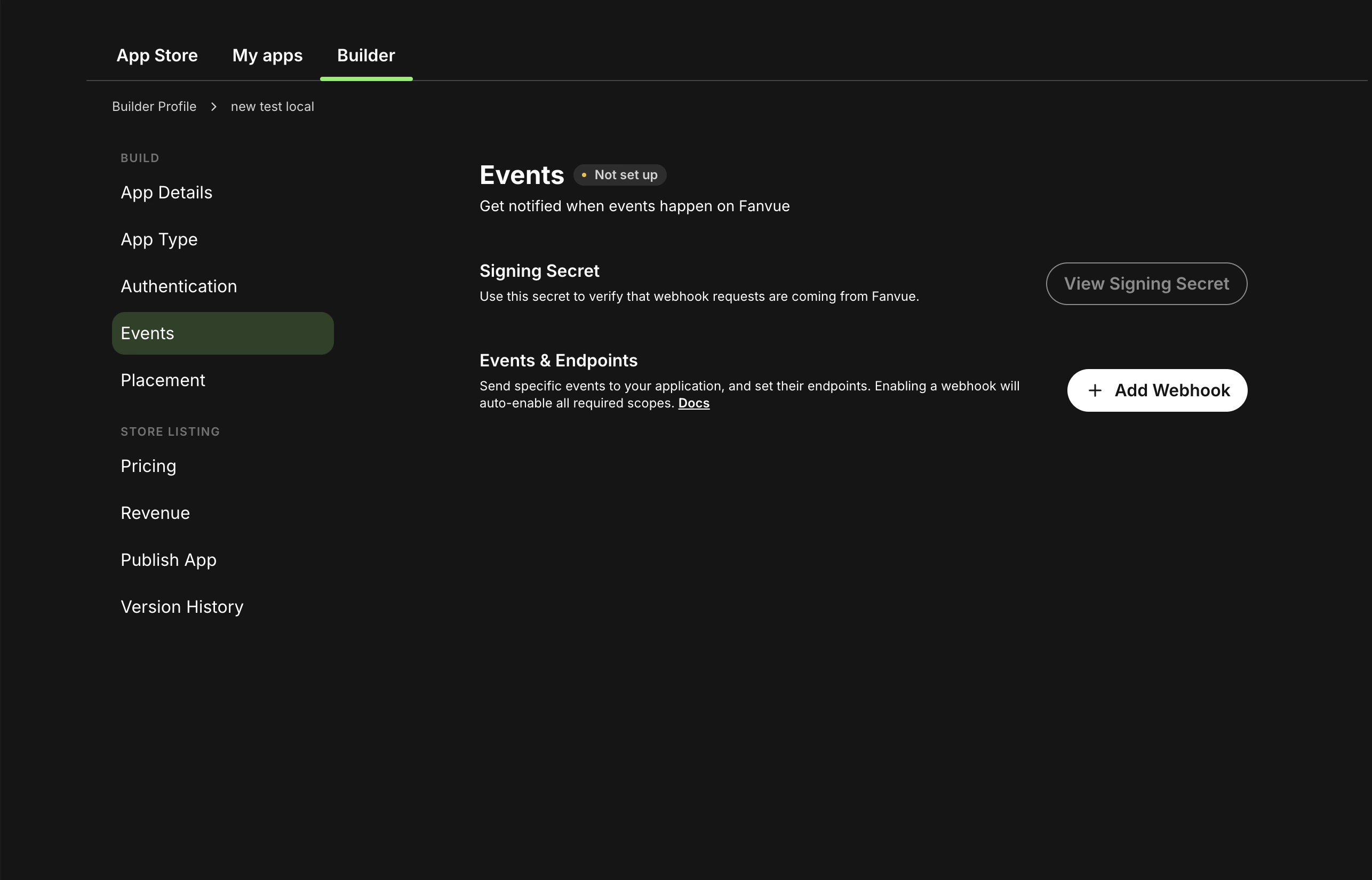 3. Click **Add Webhook**. In the dialog, enter your **Endpoint URL** and select the events you want this endpoint to receive. Use **Select All** to subscribe to every event, or tick individual events. A single endpoint can listen for multiple events.
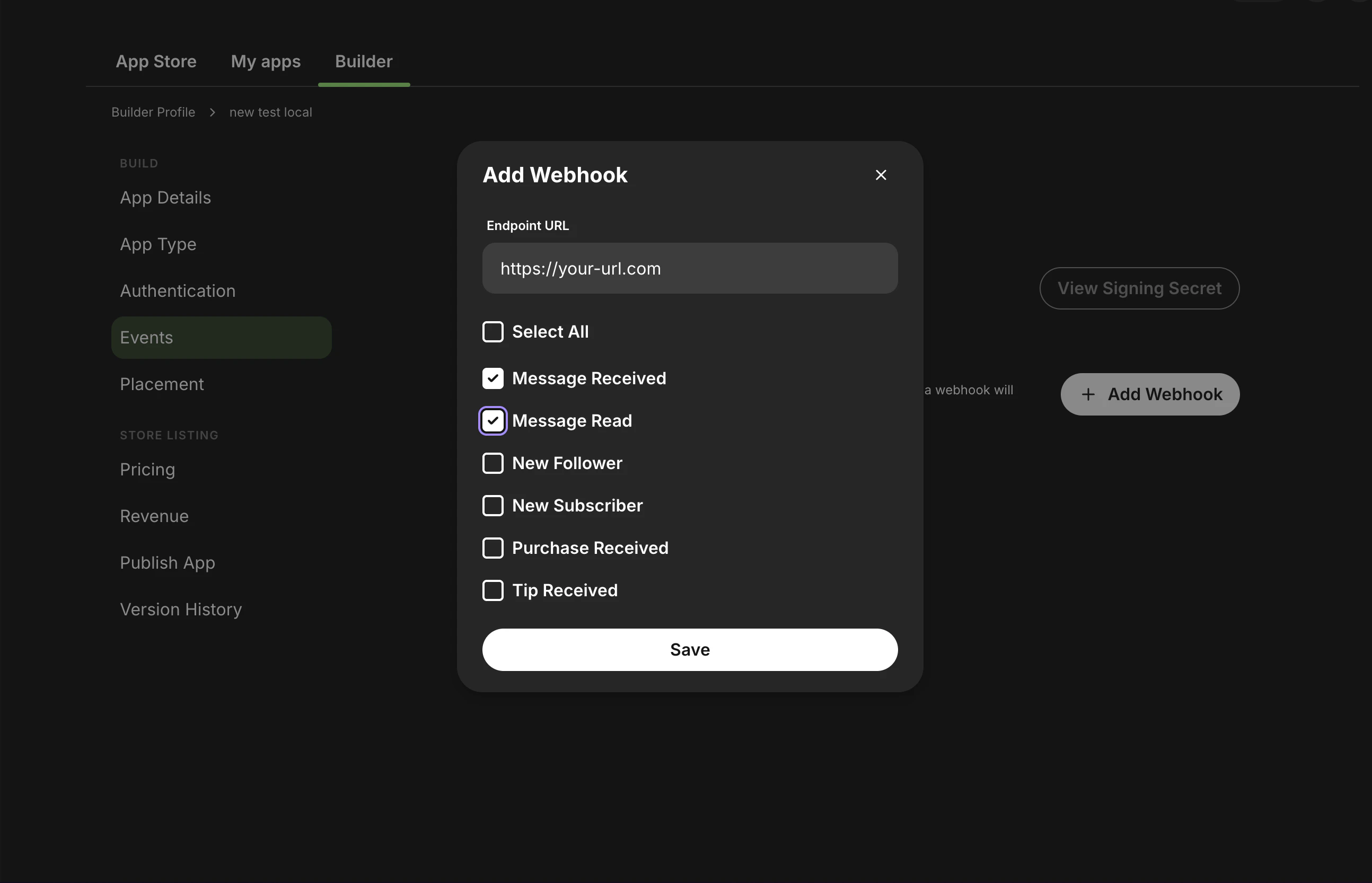 4. Click **Save**. The webhook is created and appears in the **Events & Endpoints** list, where you can enable or disable it with the toggle.
Each webhook event requires certain OAuth scopes to work. Enable the required
scopes in the **Authentication** tab. See [Required scopes per
event](#1-confirm-required-oauth-scopes-are-enabled-for-each-event) for the
full mapping.
## Missing scope warnings
Different webhook events require different OAuth scopes. For an event to be delivered, your app must have the scopes that event needs enabled in the **Authentication** tab, under **Define permissions**.
If a webhook needs scopes that your app does not yet have, the Events tab shows a warning that the required consents are missing. Enable the relevant scopes in the Authentication tab to clear it.
4. Click **Save**. The webhook is created and appears in the **Events & Endpoints** list, where you can enable or disable it with the toggle.
Each webhook event requires certain OAuth scopes to work. Enable the required
scopes in the **Authentication** tab. See [Required scopes per
event](#1-confirm-required-oauth-scopes-are-enabled-for-each-event) for the
full mapping.
## Missing scope warnings
Different webhook events require different OAuth scopes. For an event to be delivered, your app must have the scopes that event needs enabled in the **Authentication** tab, under **Define permissions**.
If a webhook needs scopes that your app does not yet have, the Events tab shows a warning that the required consents are missing. Enable the relevant scopes in the Authentication tab to clear it.
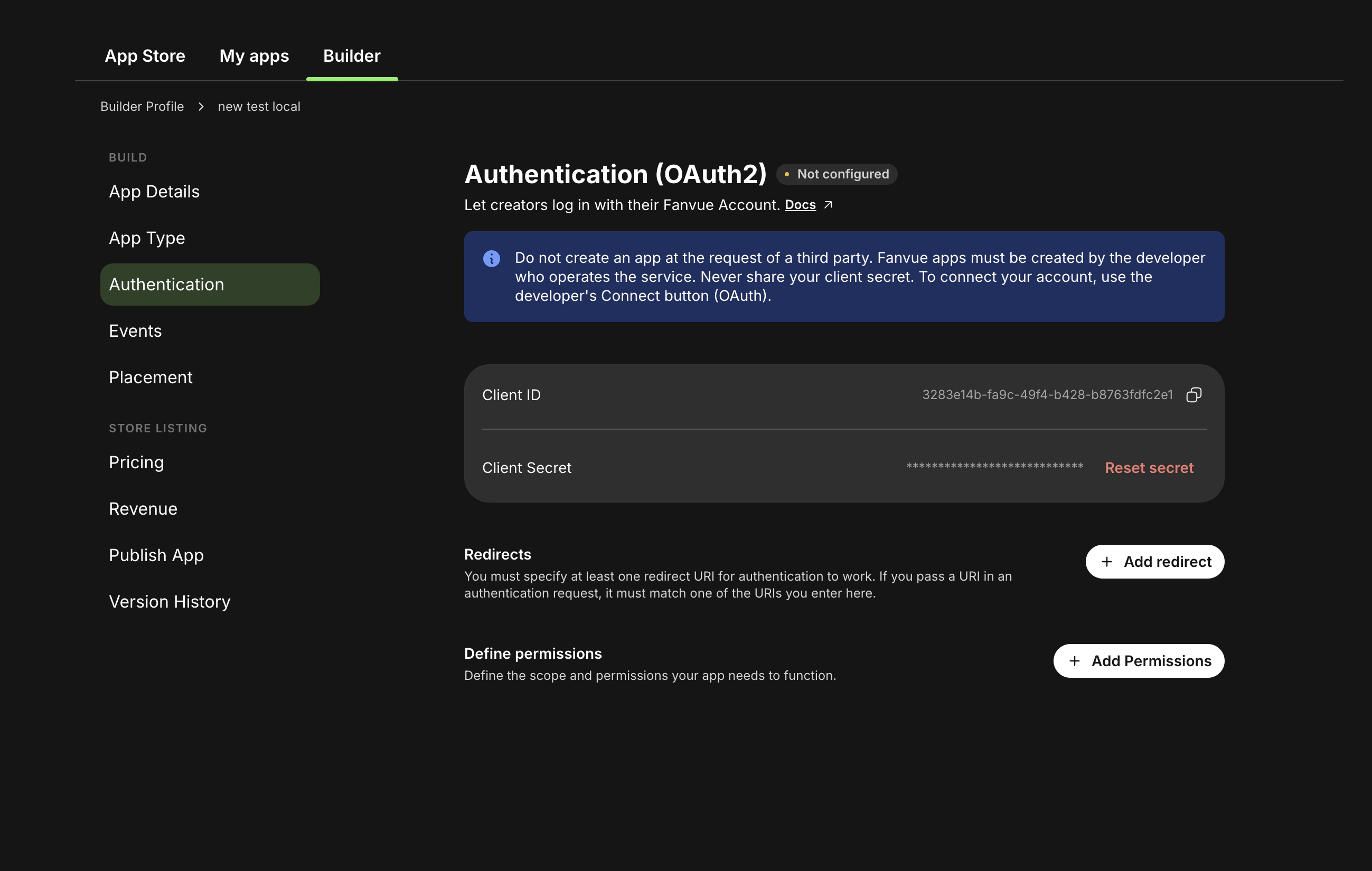 Note that adding a scope to your app is not enough on its own for already-connected users: creators who authorized your app before the scope was added must re-authorize it before those events will be delivered. See [Re-authorize the app after scope changes](#3-re-authorize-the-app-after-scope-changes).
## Managing and testing webhooks
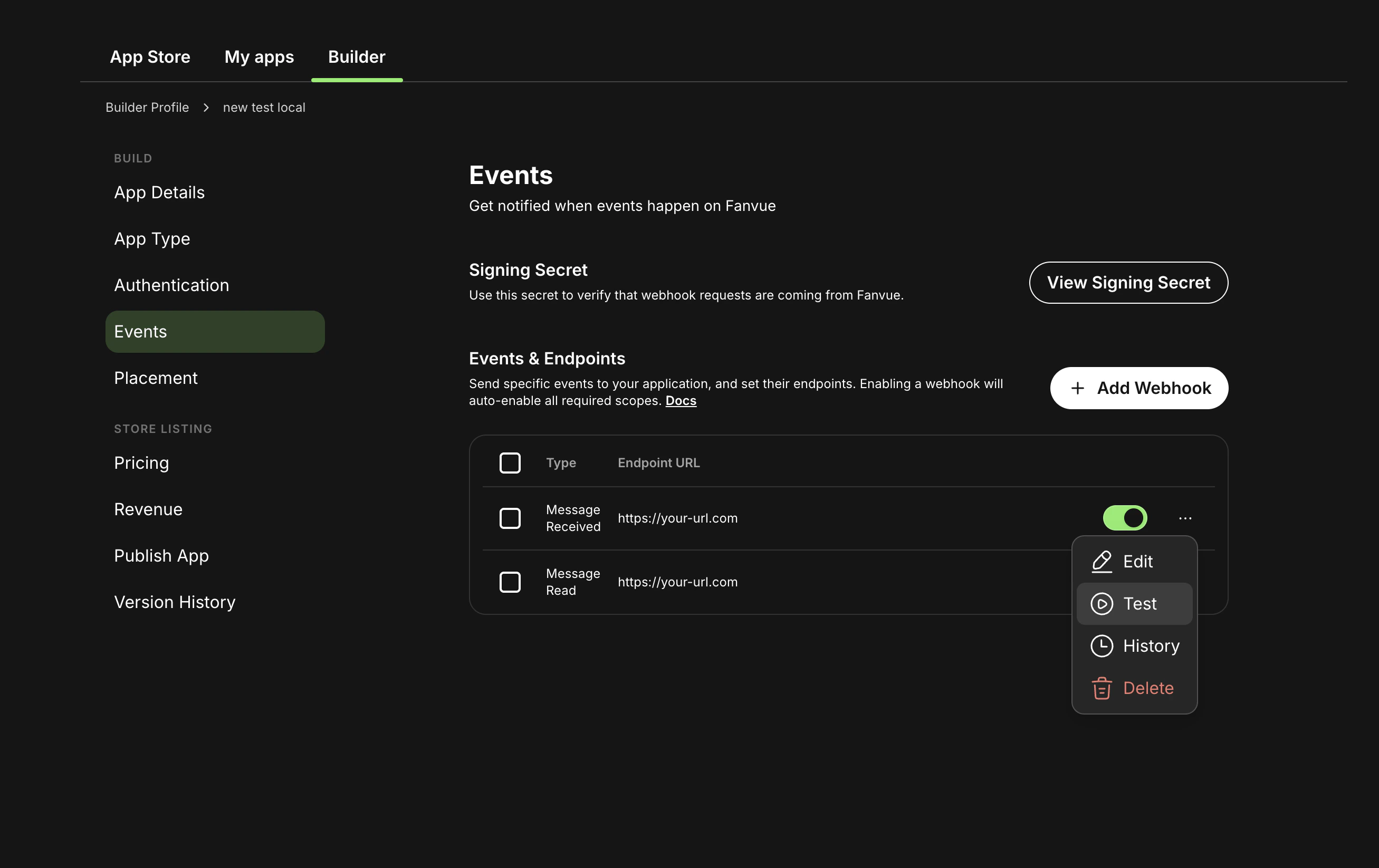
Each webhook in the **Events & Endpoints** list has an actions (**…**) menu:
* **Edit**, change the endpoint URL or the events it subscribes to.
* **Test**, send a sample payload to your endpoint so you can confirm it is reachable and that your signature verification works, without waiting for a real user action.
* **History**, review recent delivery attempts for the webhook.
* **Delete**, remove the webhook.
Note that adding a scope to your app is not enough on its own for already-connected users: creators who authorized your app before the scope was added must re-authorize it before those events will be delivered. See [Re-authorize the app after scope changes](#3-re-authorize-the-app-after-scope-changes).
## Managing and testing webhooks
Each webhook in the **Events & Endpoints** list has an actions (**…**) menu:
* **Edit**, change the endpoint URL or the events it subscribes to.
* **Test**, send a sample payload to your endpoint so you can confirm it is reachable and that your signature verification works, without waiting for a real user action.
* **History**, review recent delivery attempts for the webhook.
* **Delete**, remove the webhook.
 ## How deliveries work
* Each webhook is delivered as an HTTP POST with `Content-Type: application/json`.
* The request body contains an event-specific JSON payload.
* Your endpoint should return a 2xx response as soon as you successfully receive and persist the event.
* Delivery is **at least once**: a failed attempt is retried up to 5 times, so expect duplicates. Each payload carries an `eventId` for deduplication.
On `message.read` the `eventId` is **not** unique per event — every read
receipt in the same conversation carries the same value, so deduplicating on it
alone keeps only the first. See [Delivery, Retries and
Idempotency](/docs/webhooks/delivery-and-idempotency#read-receipts) for the safe key.
Every other flat event carries a per-event `eventId`.
For timeouts, the retry schedule, endpoint auto-disable, and deduplication, see [Delivery, Retries and Idempotency](/docs/webhooks/delivery-and-idempotency).
A single creator-tenant subscription can deliver **both** these platform event
webhooks and the [Fanvue Checkout webhooks](/docs/checkout/overview)
(`checkout_link.*`, `payout.paid`) to the same endpoint; you receive an event
only if your subscription includes that event type. Branch on the event `type`
to tell them apart (and on `data.object` for checkout events, which use a
[Standard-Webhooks envelope](/docs/checkout/overview#event-envelope) rather than
the flat payloads above).
## Verifying webhook signatures
Every webhook request includes an `X-Fanvue-Signature` header (format `t=,v0=`). Verify it on every request so forged or replayed events are rejected before you act on them.
Your app's signing secret is shown in the **Events** tab of the Developer Area (the **View signing secret** action). That one secret signs every delivery for webhooks you added **in the Developer Area**.
Webhooks registered through the API with `POST /webhooks/subscriptions` are different: each subscription gets its own secret, returned as `signingSecret` in the create response and **not retrievable afterwards**.
See [Verify Webhook Signatures](/docs/webhooks/signature-verification) for the header breakdown, both signing-secret paths, the step-by-step verification flow, and complete Node and Python samples.
## Testing locally
* Expose your local server with a tunneling tool (for example, `ngrok`) and copy the public HTTPS URL.
* Add a webhook in the **Events** tab with that URL and the events you want to receive.
* Use the **Test** action in the webhook's **…** menu to send a sample payload to your endpoint, or trigger the event in a test environment, then inspect the request reaching your server.
## Troubleshooting: test events work, but production events do not
If webhook test deliveries succeed but real user activity does not trigger events, use this checklist.
### 1) Confirm required OAuth scopes are enabled for each event
| Webhook event | Required scope |
| ------------------------ | -------------- |
| `follow.new` | `read:creator` |
| `purchase.new` | `read:creator` |
| `subscription.new` | `read:creator` |
| `subscription.cancelled` | `read:creator` |
| `subscription.expired` | `read:creator` |
| `tip.new` | `read:creator` |
| `message.received` | `read:chat` |
| `message.sent` | `read:chat` |
| `message.read` | `read:chat` |
| `creator.logout` | `read:self` |
### 2) Confirm the webhook event checkbox is enabled
In your app's **Webhooks** tab, verify the event type is selected for the webhook endpoint you configured.
### 3) Re-authorize the app after scope changes
If scopes were added after users already connected your app, previously granted consent may not include those scopes yet.
1. Open `https://fanvue.com/settings/account/third-party-apps`
2. Revoke access for your app
3. Reconnect the app and approve the requested scopes again
### 4) Validate with a real production action
Use an actual follow, purchase, subscription, tip, or message event from a separate account and verify delivery on your endpoint logs.
## Example endpoint (Node.js / Express)
```ts theme={null}
import crypto from "crypto";
import express from "express";
const app = express();
const SIGNING_SECRET = process.env.FANVUE_WEBHOOK_SECRET!;
const TOLERANCE_SECONDS = 300; // 5 minutes
function verifyWebhookSignature(
payload: string,
signatureHeader: string,
): boolean {
const parts = signatureHeader.split(",");
let timestamp: string | undefined;
let signature: string | undefined;
for (const part of parts) {
const [key, value] = part.split("=");
if (key === "t") timestamp = value;
if (key === "v0") signature = value;
}
if (!timestamp || !signature) return false;
const currentTime = Math.floor(Date.now() / 1000);
if (Math.abs(currentTime - parseInt(timestamp, 10)) > TOLERANCE_SECONDS) {
return false;
}
const signedPayload = `${timestamp}.${payload}`;
const expectedSignature = crypto
.createHmac("sha256", SIGNING_SECRET)
.update(signedPayload)
.digest("hex");
return crypto.timingSafeEqual(
Buffer.from(signature),
Buffer.from(expectedSignature),
);
}
// Use raw body for signature verification
app.use(
express.json({
verify: (req: any, _res, buf) => {
req.rawBody = buf.toString();
},
}),
);
app.post("/webhooks/fanvue", (req: any, res) => {
const signatureHeader = req.headers["x-fanvue-signature"];
if (
!signatureHeader ||
!verifyWebhookSignature(req.rawBody, signatureHeader)
) {
res.status(401).json({ error: "Invalid signature" });
return;
}
const event = req.body;
// Process the event...
res.sendStatus(200);
});
app.listen(3000);
```
## How deliveries work
* Each webhook is delivered as an HTTP POST with `Content-Type: application/json`.
* The request body contains an event-specific JSON payload.
* Your endpoint should return a 2xx response as soon as you successfully receive and persist the event.
* Delivery is **at least once**: a failed attempt is retried up to 5 times, so expect duplicates. Each payload carries an `eventId` for deduplication.
On `message.read` the `eventId` is **not** unique per event — every read
receipt in the same conversation carries the same value, so deduplicating on it
alone keeps only the first. See [Delivery, Retries and
Idempotency](/docs/webhooks/delivery-and-idempotency#read-receipts) for the safe key.
Every other flat event carries a per-event `eventId`.
For timeouts, the retry schedule, endpoint auto-disable, and deduplication, see [Delivery, Retries and Idempotency](/docs/webhooks/delivery-and-idempotency).
A single creator-tenant subscription can deliver **both** these platform event
webhooks and the [Fanvue Checkout webhooks](/docs/checkout/overview)
(`checkout_link.*`, `payout.paid`) to the same endpoint; you receive an event
only if your subscription includes that event type. Branch on the event `type`
to tell them apart (and on `data.object` for checkout events, which use a
[Standard-Webhooks envelope](/docs/checkout/overview#event-envelope) rather than
the flat payloads above).
## Verifying webhook signatures
Every webhook request includes an `X-Fanvue-Signature` header (format `t=,v0=`). Verify it on every request so forged or replayed events are rejected before you act on them.
Your app's signing secret is shown in the **Events** tab of the Developer Area (the **View signing secret** action). That one secret signs every delivery for webhooks you added **in the Developer Area**.
Webhooks registered through the API with `POST /webhooks/subscriptions` are different: each subscription gets its own secret, returned as `signingSecret` in the create response and **not retrievable afterwards**.
See [Verify Webhook Signatures](/docs/webhooks/signature-verification) for the header breakdown, both signing-secret paths, the step-by-step verification flow, and complete Node and Python samples.
## Testing locally
* Expose your local server with a tunneling tool (for example, `ngrok`) and copy the public HTTPS URL.
* Add a webhook in the **Events** tab with that URL and the events you want to receive.
* Use the **Test** action in the webhook's **…** menu to send a sample payload to your endpoint, or trigger the event in a test environment, then inspect the request reaching your server.
## Troubleshooting: test events work, but production events do not
If webhook test deliveries succeed but real user activity does not trigger events, use this checklist.
### 1) Confirm required OAuth scopes are enabled for each event
| Webhook event | Required scope |
| ------------------------ | -------------- |
| `follow.new` | `read:creator` |
| `purchase.new` | `read:creator` |
| `subscription.new` | `read:creator` |
| `subscription.cancelled` | `read:creator` |
| `subscription.expired` | `read:creator` |
| `tip.new` | `read:creator` |
| `message.received` | `read:chat` |
| `message.sent` | `read:chat` |
| `message.read` | `read:chat` |
| `creator.logout` | `read:self` |
### 2) Confirm the webhook event checkbox is enabled
In your app's **Webhooks** tab, verify the event type is selected for the webhook endpoint you configured.
### 3) Re-authorize the app after scope changes
If scopes were added after users already connected your app, previously granted consent may not include those scopes yet.
1. Open `https://fanvue.com/settings/account/third-party-apps`
2. Revoke access for your app
3. Reconnect the app and approve the requested scopes again
### 4) Validate with a real production action
Use an actual follow, purchase, subscription, tip, or message event from a separate account and verify delivery on your endpoint logs.
## Example endpoint (Node.js / Express)
```ts theme={null}
import crypto from "crypto";
import express from "express";
const app = express();
const SIGNING_SECRET = process.env.FANVUE_WEBHOOK_SECRET!;
const TOLERANCE_SECONDS = 300; // 5 minutes
function verifyWebhookSignature(
payload: string,
signatureHeader: string,
): boolean {
const parts = signatureHeader.split(",");
let timestamp: string | undefined;
let signature: string | undefined;
for (const part of parts) {
const [key, value] = part.split("=");
if (key === "t") timestamp = value;
if (key === "v0") signature = value;
}
if (!timestamp || !signature) return false;
const currentTime = Math.floor(Date.now() / 1000);
if (Math.abs(currentTime - parseInt(timestamp, 10)) > TOLERANCE_SECONDS) {
return false;
}
const signedPayload = `${timestamp}.${payload}`;
const expectedSignature = crypto
.createHmac("sha256", SIGNING_SECRET)
.update(signedPayload)
.digest("hex");
return crypto.timingSafeEqual(
Buffer.from(signature),
Buffer.from(expectedSignature),
);
}
// Use raw body for signature verification
app.use(
express.json({
verify: (req: any, _res, buf) => {
req.rawBody = buf.toString();
},
}),
);
app.post("/webhooks/fanvue", (req: any, res) => {
const signatureHeader = req.headers["x-fanvue-signature"];
if (
!signatureHeader ||
!verifyWebhookSignature(req.rawBody, signatureHeader)
) {
res.status(401).json({ error: "Invalid signature" });
return;
}
const event = req.body;
// Process the event...
res.sendStatus(200);
});
app.listen(3000);
```